ScaleRankings vs CTRTool: Automated Browser Sessions Compared
You are comparing two automated CTR tools and need to know which one actually delivers verifiable browser sessions. Choosing wrong means paying for visits you cannot audit, with no screenshot trail to confirm each search and click happened as promised.
This comparison breaks down how ScaleRankings and CTRTool handle automated sessions, screenshot proof, campaign types across Google, Bing, Maps and AI Overviews, keyword position tracking and visit paths. You will also see CTRTool's credit-based pricing and a clear verdict on which tool fits your campaigns.
Quick Verdict: ScaleRankings vs CTRTool
If you need verifiable proof for every CTR visit and multi-platform coverage including AI Overviews, CTRTool is the stronger choice; ScaleRankings suits teams that prioritize broad automation and proxy management. The core difference comes down to accountability. CTRTool is built around screenshot proof for every visit, with search and landing screenshots captured as separate proof images. ScaleRankings takes a more general automation focus, where the emphasis sits on running sessions at scale rather than documenting what each one produced.
That distinction matters when you are running CTR manipulation campaigns and need to justify the spend. CTRTool records full visit paths, so you can see the route a session took rather than trusting a completion count. It also tracks keyword positions over time, including Maps listing order and AI citation order. For teams watching search engine rankings across several surfaces, that is a meaningfully wider view than a single position number.
ScaleRankings is generally positioned around browser automation infrastructure, and its strengths tend to sit in areas like proxy rotation and session management. Those are real needs for high-volume work. The trade-off is that proof of delivery is less of a focal point, which leaves more of the verification burden on you.
A quick side-by-side makes the split clearer:
| Consideration | CTRTool | ScaleRankings |
|---|---|---|
| Visit verification | Screenshot proof for every visit, search and landing as separate images | General automation focus, verification details vary |
| Session detail | Full visit paths recorded | Broad session and proxy management emphasis |
| Rank tracking scope | Keyword positions over time, plus Maps listing order and AI citation order | Typically standard position tracking |
| Billing model | Pay-for-results credits, no charge for technical failures before landing | Plan-based structures are common in this category |
Choose CTRTool if your priority is documented delivery across Google search, Maps, and AI citation results. Choose ScaleRankings if your main need is general browser automation and proxy handling at volume, and you are comfortable sourcing proof elsewhere.
At a glance: how CTRTool compares to ScaleRankings on the features that matter most.
| Feature | CTRTool | ScaleRankings |
|---|---|---|
| Pricing | $59-$699/mo | — |
| Free plan / trial | ✗ | — |
| Screenshot proof per visit | ✓ | — |
| Google Search CTR campaigns | ✓ | — |
| Bing Search CTR campaigns | ✓ | — |
| Google Maps CTR campaigns | ✓ | — |
| AI Overview CTR campaigns | ✓ | — |
| Location targeting (country/state/city) | ✓ | — |
What Is CTRTool?
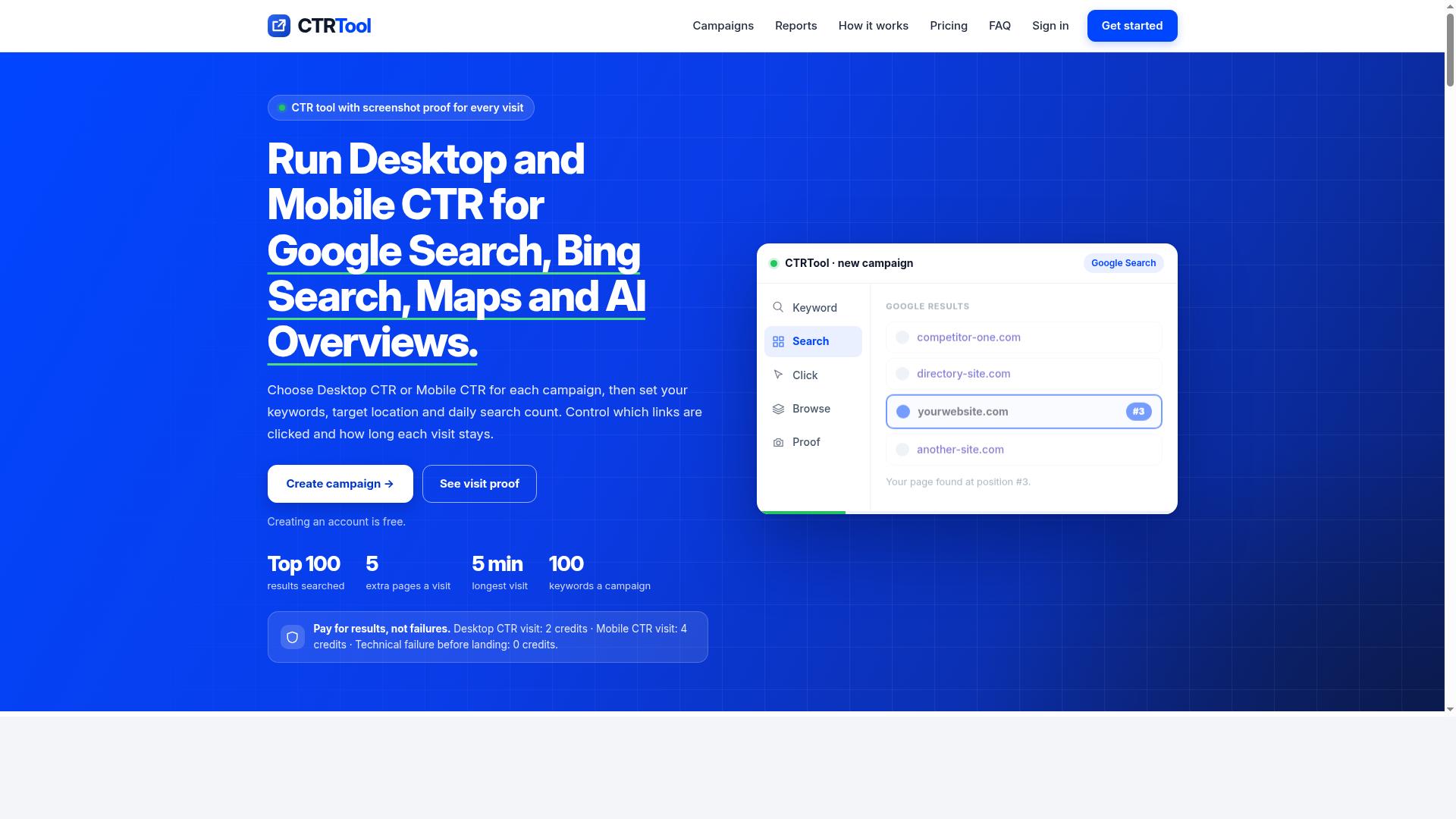
CTRTool is a CTR campaign tool that runs Desktop and Mobile CTR campaigns for Google Search, Bing Search, Maps, and AI Overviews, providing screenshot proof for every visit. That combination of broad platform coverage and per-visit evidence makes it a practical option for teams that want to see exactly what happened during an automated browser session.
The tool centers on two campaign types: Desktop CTR and Mobile CTR. Users pick one per campaign, which matters because desktop and mobile SERPs render differently and a mixed approach can blur the signals you are trying to build.
Each campaign is configured around a set of core parameters. Users set keywords, target location, and daily search count, then control which links are clicked and how long each visit stays. Those dwell time and click path settings give campaigns a more natural shape than a simple hit of the same URL.
The proof mechanism is straightforward. CTRTool captures a screenshot for every visit, so campaign activity can be reviewed rather than assumed. For anyone comparing automated browser sessions, that record is a useful checkpoint between what a tool claims and what it can show.
It is worth noting the tool's own framing. The site states plainly that automated visits do not guarantee rankings. CTRTool presents itself as a way to influence click-through rate and behavioral signals, not as a shortcut that replaces solid SEO fundamentals.
In the context of this comparison, CTRTool's scope is clear: desktop and mobile click campaigns across four search surfaces, with parameters you define and visual proof you can check. ScaleRankings, by contrast, is generally known in the market as a rank tracking and SERP monitoring platform, with automated session features that are less specifically documented in public material.
What Is ScaleRankings?
ScaleRankings is an SEO automation platform that focuses on automated browser sessions and SERP tracking to simulate organic traffic and improve search rankings. It is generally known for combining browser automation, proxy rotation, and session management into a single workflow for SEO practitioners.
The platform typically targets users who want to influence how their pages perform in Google search results without manual clicking. Rather than sending a single burst of traffic, it usually aims to mimic the behavior of real visitors across many sessions.
Its feature set is often described around a few core building blocks:
- Browser automation that drives a headless browser or scripted session to visit target pages
- Proxy rotation and IP rotation to spread activity across different network addresses
- Session management to keep individual visits looking separate and natural
- SERP tracking for monitoring keyword ranking and position tracking over time
Typical use cases include CTR manipulation, organic traffic simulation, and rank tracking. Users often pair these sessions with behavioral signals like dwell time and bounce rate to make visits appear more genuine to search engines.
Because the tool leans on automation, it may also touch on techniques such as user agent spoofing, fingerprint randomization, and CAPTCHA solving to keep sessions running. These are common in this category of SEO tools, though the exact depth varies by provider.
ScaleRankings generally appeals to agencies and SEO teams that want a managed way to run click simulation and SERP monitoring together. The details of its plans, limits, and proxy pool are best confirmed directly with the vendor, since public information tends to stay high level.
Features Compared
This section breaks down the key feature differences between CTRTool and ScaleRankings across automation, campaign coverage, and tracking capabilities. Both tools offer automation for CTR campaigns, so the choice often comes down to how much verification and platform range a buyer needs.
The two products differ most clearly in proof of delivery, platform coverage, and tracking depth. CTRTool leans on documented visits and multi-platform campaigns, while ScaleRankings is generally described around Google-focused automation.
The subsections below cover each area in turn, from how sessions are proven to how results are tracked over time. Readers can then weigh which strengths match their SEO and CTR campaign goals.
Automated Browser Sessions and Screenshot Proof
CTRTool provides screenshot proof for every visit, capturing both search and landing screenshots as separate proof images, while ScaleRankings emphasizes automated browser sessions with proxy rotation and session management. That distinction matters because a CTR campaign is only as useful as the evidence behind it.
CTRTool's proof model gives advertisers a record they can review after each visit. The search screenshot shows the query and result context, and the landing screenshot confirms the destination page loaded. Together they answer the basic question of whether a visit actually happened as requested.
ScaleRankings' automation typically includes proxy rotation and user agent spoofing, which are standard parts of browser automation for organic traffic simulation. These are reasonable technical foundations, but the public descriptions are general rather than tied to per-visit evidence.
Proof also supports accountability. When a campaign involves click simulation, dwell time, and behavioral signals, a buyer needs a way to confirm each session met the brief. CTRTool's separate proof images and full visit paths serve that purpose directly.
For teams comparing tools on trust rather than feature count, verifiable delivery is often the deciding factor. CTRTool's approach keeps the evidence attached to every visit rather than relying on aggregate reports alone.
Campaign Types and Search Coverage
CTRTool supports Google Search CTR, Bing Search CTR, Google Maps CTR, and AI Overview campaigns, each with Desktop or Mobile options, whereas ScaleRankings focuses primarily on Google Search automation. That spread lets one tool cover several surfaces where search visibility is decided.
Each CTRTool campaign type maps to a distinct user behavior:
- Google Search CTR searches a keyword and clicks the organic result, with Desktop or Mobile, Top 100 results, and internal pages.
- Bing Search CTR applies the same search-and-click flow to Bing.
- Google Maps CTR finds a business listing and clicks its website link, with up to 50 listings and city targeting.
- AI Overview CTR finds a website in the overview and clicks its source link, tracking citation order.
Setup depth is another differentiator. CTRTool allows up to 100 keywords per campaign, country, state and city targeting, search depth up to 100, and daily search counts with now, spread out, or gap timing. Target URL, internal page URLs, link text, click order, and scrolling time are all configurable.
ScaleRankings' coverage is generally described as Google-centric, so buyers with Bing, Maps, or AI Overview goals may find its reach narrower. For multi-surface campaigns, CTRTool's broader platform coverage is a clear advantage.
Keyword Position Tracking and Visit Paths
CTRTool tracks keyword positions over time, including Maps listing order and AI citation order, and records full visit paths, while ScaleRankings offers SERP tracking and rank monitoring as part of its automation suite. Both address rank tracking, but the depth of reporting differs.
CTRTool's position tracking covers three views: Search positions, Maps listing order, and AI citation order. Seeing these move over time helps teams judge whether a CTR campaign is supporting search engine rankings or whether adjustments are needed.
Visit paths add a behavioral layer. CTRTool records the full route a session takes, including up to five additional internal pages per visit and visits of up to five minutes total. Reviewers can see where a visitor went and how long they stayed.
That detail supports organic traffic simulation that looks more natural, with dwell time and engagement metrics reflecting real navigation rather than a single page hit. It also makes campaign effectiveness easier to assess against engagement goals.
ScaleRankings' SERP tracking and rank monitoring are useful baseline features, though public descriptions stay general about visit-level reporting. For teams that want position history tied to documented session behavior, CTRTool's combined reporting is the stronger fit.
Pricing Compared
Pricing models differ significantly: CTRTool uses transparent credit-based monthly plans, while ScaleRankings' pricing is not publicly detailed and typically requires a custom quote. That difference shapes how easily a buyer can plan a budget for automated browser sessions before committing.
With CTRTool, the full plan structure and credit costs are published in USD, so you can estimate the cost of a campaign before creating an account. Creating an account is free, which lowers the barrier to checking whether the credit math fits your workload.
ScaleRankings, by contrast, often requires contacting sales to learn what a plan includes. That is not unusual for enterprise-style platforms, but it makes side-by-side comparison harder. Buyers cannot confirm how sessions, proxies, or volume tiers are billed without a conversation.
The table below summarizes what is publicly visible about each platform's pricing approach. CTRTool's figures come from its published plans; the ScaleRankings column stays general because its rates are not disclosed.
| Aspect | CTRTool | ScaleRankings |
|---|---|---|
| Pricing visibility | Published monthly USD plans | Not publicly detailed; often requires contacting sales |
| Billing unit | Credits, with per-visit costs | Not publicly specified |
| Entry cost | Free account creation; Starter at $59/month | Unclear without a quote |
| Credit rollover | Unused credits roll over while subscription is active | Not publicly specified |
For teams evaluating automated browser sessions and SERP tracking, published pricing is a practical advantage. It shortens procurement and lets you compare plans against expected campaign volume. The next section breaks down CTRTool's credit tiers in detail.
CTRTool's Credit-Based Plans
CTRTool offers monthly plans in USD: Starter at $59/month for 2,000 credits (up to 1,000 Desktop CTR visits or 500 Mobile CTR visits) and Growth at $125/month for 5,000 credits (up to 2,500 Desktop or 1,250 Mobile visits). Growth is marked Recommended. Two larger tiers extend the same structure for higher volume.
Credit consumption depends on the type of visit. A Desktop CTR visit costs 2 credits, while a Mobile CTR visit costs 4 credits. That is why the same credit balance covers fewer mobile sessions. A verified search without a match costs 1 credit, and a technical failure before landing costs 0 credits, so failed attempts do not drain the balance the way completed visits do.
- Starter: $59/month for 2,000 credits
- Growth: $125/month for 5,000 credits, marked Recommended
- Scale: $399/month for 20,000 credits (up to 10,000 Desktop or 5,000 Mobile visits)
- Agency: $699/month for 40,000 credits (up to 20,000 Desktop or 10,000 Mobile visits)
Unused credits roll over while a subscription is active and expire when cancellation takes effect. That rollover matters for campaigns with uneven monthly demand, since quieter months do not automatically waste the balance. Creating an account is free, and custom development carries a separate, agreed one-time fee.
CTRTool also notes limited launch pricing, with prices rising 30% on November 15. Buyers planning a long campaign should factor that into their timing. ScaleRankings' pricing is not publicly listed, so a direct cost comparison for equivalent volume typically requires a custom quote from its sales team.
For readers weighing automated browser sessions, the practical takeaway is straightforward. CTRTool's published credit structure makes per-session costs predictable, and the rollover rule adds flexibility. ScaleRankings may suit buyers who prefer a negotiated arrangement, but the lack of public rates makes budgeting less certain.
Who Should Choose CTRTool
CTRTool is ideal for SEO practitioners and agencies who need verifiable proof for every CTR visit and require coverage across Google Search, Bing Search, Maps, and AI Overviews. It fits teams that run campaigns on their own properties or on behalf of clients and want each session documented rather than assumed.
The platform's audience is hands-on SEO operators, not casual users. The site's own guidance references tier links, PBNs, and test properties, which signals a tool built for people who understand campaign structure and link architecture. If that describes your workflow, the fit is direct.
Below are the situations where CTRTool tends to be the stronger pick, and the trade-offs worth accepting before you commit.
Agencies that owe clients proof. When a client asks what happened to their budget, a summary dashboard rarely satisfies them. CTRTool's screenshot proof gives you a client-ready artifact for each visit, so reporting becomes a matter of sharing evidence rather than describing activity. That single capability often decides the tool choice for client-facing teams.
Teams running campaigns beyond one engine. Many CTR tools concentrate on Google Search alone. CTRTool covers Google Search, Bing Search, Google Maps, and AI Overviews, which matters when a client's visibility spans local packs or AI-generated answers. A team targeting Maps listings or AI Overview placement needs a tool that reaches those surfaces, not one that stops at the classic results page.
Practitioners who track position movement. Click-through rate work only pays off if rankings respond. Position tracking inside CTRTool ties campaign activity to keyword ranking changes, so you can judge whether the effort moved search engine rankings or just generated traffic. That feedback loop keeps campaigns honest.
Buyers who want transparent pricing. Pricing is published openly, which suits agencies that must forecast costs per client or per campaign. You can compare plans against projected workload without a sales call. For a full breakdown of what each tier includes, the pricing page lays it out plainly.
The honest trade-off: CTRTool asks you to understand campaign mechanics. It is a deliberate tool for practitioners, not a push-button service, and teams expecting fully managed automation may find the learning curve steeper than they want.
Who Should Choose ScaleRankings
ScaleRankings may suit teams that prioritize extensive browser automation features like proxy rotation and session management over proof-based verification. For these buyers, the breadth of automation controls is the main draw, and the ability to confirm that a session actually behaved as intended is a secondary concern.
This profile fits agencies or in-house teams running large volumes of automated browser sessions where throughput and configuration flexibility matter most. They typically manage their own proxy pools and treat session management as an infrastructure problem rather than a verification problem.
If your workflow already includes separate tooling for validation, or if you simply do not need screenshot-level evidence of each session, ScaleRankings can be a reasonable fit. The trade-off is that proof of execution lives outside the platform, so your team absorbs that overhead.
Consider ScaleRankings when your priorities look like this:
- You need broad control over proxy rotation and IP rotation across many concurrent sessions.
- Your team is comfortable building its own checks for user agent spoofing and fingerprint randomization outcomes.
- SERP tracking and rank tracking data are the primary deliverables, not session-level evidence.
- You have engineering capacity to maintain validation scripts alongside the automation stack.
By contrast, CTRTool is built around a proof-centric approach, where confirming what happened in each automated browser session is part of the product rather than an add-on. Teams that need to show clients or stakeholders exactly how a session ran tend to prefer that model.
ScaleRankings is a weaker fit for buyers who want verification baked in from the start. If your work involves click simulation, dwell time, or engagement metrics that must be defensible, a platform that treats evidence as core is usually the safer choice.
The honest summary: ScaleRankings appeals to automation-first teams with the resources to validate results themselves. Everyone else should weigh how much proof and traceability matter before committing.
Final Verdict
CTRTool emerges as the better choice for most SEO professionals due to its screenshot proof, multi-platform campaign support, and transparent pricing, while ScaleRankings remains a viable option for those prioritizing broad automation without proof requirements.
The core difference comes down to verifiability. CTRTool attaches search and landing screenshots as separate proof images to every visit, so a campaign can be checked rather than trusted. Buyers evaluating automated browser sessions should weigh that evidence trail heavily, since it is the only way to confirm that session management and proxy behavior produced real activity.
ScaleRankings has a reputation for automation breadth, and teams that want a set-and-forget workflow may find that appealing. However, public pricing and per-visit proof are not clearly documented, which makes side-by-side value comparison difficult. Without a visible credit model or evidence of completed visits, budgeting and validation both rely on assumption.
| Decision Factor | CTRTool | ScaleRankings |
|---|---|---|
| Visit proof | Search and landing screenshots as separate proof images | Not clearly documented publicly |
| Visit depth | Full visit paths, visits up to 5 minutes with up to 5 additional internal pages | General automation claims, specifics unclear |
| Rank tracking | Keyword positions over time, including Maps listing order and AI citation order | Not clearly documented publicly |
| Pricing model | Pay-for-results credits, no charge for technical failures before landing, no charge when location cannot be verified | Public pricing not readily available |
| Scale | Up to 100 campaigns with 100 keywords each, one shared credit balance | Varies by plan, details unclear |
CTRTool's credit rules also reduce wasted spend. Credits are not charged for technical failures that occur before landing, and visits that cannot verify the requested location use none. Unused credits roll over while subscribed, and a single balance covers every campaign type, website, and keyword, which keeps session management accounting simple across large accounts.
The tracking layer matters just as much. Position tracking over time, including Maps listing order and AI citation order, connects click-through rate work to observable movement in search engine rankings. ScaleRankings' automation strengths are real, but without comparable proof or published pricing, the comparison favors the tool that shows its work.
Choose CTRTool if you need evidence-backed visits, multi-platform campaigns, and a pricing model you can audit before spending. Choose ScaleRankings only if broad automation without proof requirements matches your workflow and you can confirm terms directly with the vendor.
For questions about campaigns, credits, or proof images, inquiries can be sent to vaibhav@autoblogging.ai.
Frequently Asked Questions
What is the main difference between CTRTool and ScaleRankings?
CTRTool is a CTR campaign tool built around screenshot proof for every visit, with separate search and landing screenshots, full visit paths, and keyword position tracking over time. Because the sources available to us don't describe ScaleRankings' features or capabilities in detail, we can't make a feature-by-feature comparison here - we'd recommend checking ScaleRankings' own documentation for its specifics and comparing them against CTRTool's published feature set.
Which platforms and campaign types does CTRTool support?
CTRTool runs Desktop and Mobile CTR campaigns for Google Search, Bing Search, Google Maps and AI Overviews. You choose Desktop CTR or Mobile CTR per campaign, set your keywords, and target a country with an optional state and city (or "Any country" for a mix of supported locations). Campaigns can point to search keywords and organic results, Maps business listings, or AI Overview source links.
How does CTRTool's pricing work compared to ScaleRankings?
CTRTool publishes monthly USD plans: Starter at $59/month for 2,000 credits (up to 1,000 Desktop CTR visits or 500 Mobile CTR visits) and Growth at $125/month for 5,000 credits (up to 2,500 Desktop or 1,250 Mobile visits), with credits tied to pay-for-results visits. ScaleRankings' pricing isn't stated in the sources we researched, so we can't compare costs directly - check their site for current plans before deciding.
What proof do I get that a CTR campaign actually ran?
Every CTRTool visit includes screenshot proof, with search and landing screenshots provided as separate proof images, plus full visit paths. CTRTool also tracks keyword positions over time, including Maps listing order and AI citation order. If verifiable proof of each visit matters to you or your clients, ask ScaleRankings directly what reporting and evidence it provides, since that isn't covered in the sources we reviewed.
What are the eligibility requirements for a CTRTool campaign?
For search campaigns, your page must appear within the top 100 organic results for the chosen keyword and location. Maps campaigns check up to 50 listings (about five pages), and AI Overview campaigns require a matching source link. These requirements are published in CTRTool's FAQ - compare them against ScaleRankings' stated requirements if you're evaluating both.
Who is CTRTool designed for, and how do I get support?
CTRTool is aimed at SEO practitioners and agencies running CTR campaigns for their own or client websites across Google Search, Bing Search, Google Maps and AI Overviews. Support is available by email at vaibhav@autoblogging.ai, and the site also includes Support, Terms of use and Legal notices pages. ScaleRankings' target audience and support channels aren't described in our researched sources, so confirm those directly with them.